

Why your slow website is ghosting Google searchers
Why Your Slow Website Is Invisible to Google Searchers
The google site speed ranking factor is real, confirmed, and actively affecting your search rankings right now in 2026.
Here is the quick answer if you need it fast:
- Does site speed affect Google rankings?
- Yes. Google officially made page speed a desktop ranking factor in 2010 and a mobile ranking factor in 2018.
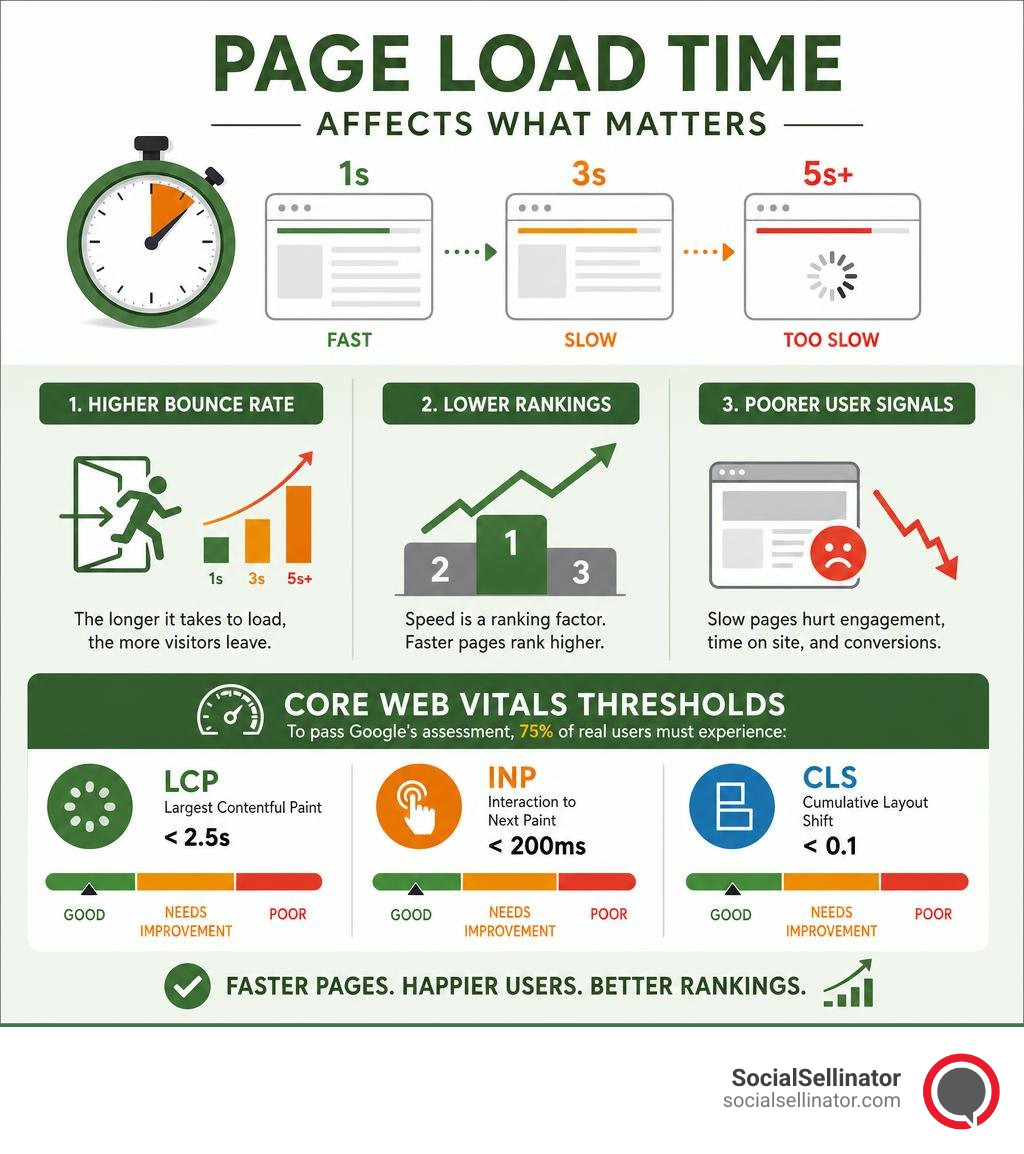
- Speed is measured through Core Web Vitals — three metrics: LCP (loading), INP (interactivity), and CLS (visual stability).
- Google uses real-user data (not just lab scores) to evaluate your pages.
- Speed acts as a tie-breaker — it won’t save thin content, but it can push a good page above an equally good competitor.
- To pass Google’s assessment, 75% of your real users must experience: LCP under 2.5s, INP under 200ms, and CLS under 0.1.
Think about the last time you clicked a search result and stared at a blank screen for four seconds. You probably hit the back button.
Your users do the same thing. Google knows it.
Research shows users abandon a site after roughly 3 seconds on a slow mobile connection. Every second of delay chips away at the time users spend on your page — and Google watches those signals closely.
This matters enormously for marketing leaders at small and midsize businesses. You’re investing in content, SEO, and paid traffic — but if your site loads slowly, a significant slice of that investment is simply wasted. Visitors leave before they read a word. Google notices the pattern and quietly pushes your pages down the results.
The good news: page speed is one of the most fixable ranking problems you’ll face. Unlike building backlinks or establishing topical authority over months, many speed improvements can be made in days.
This guide walks you through exactly what Google measures, why it matters for your rankings, and what you can do about it.
Basic google site speed ranking factor vocab:
Understanding the Google Site Speed Ranking Factor in 2026
To understand how speed impacts your search engine visibility today, we have to look at how Google’s relationship with performance has evolved. Google first introduced site speed as a ranking factor for desktop searches back in 2010. By July 2018, this was expanded to mobile search results through the “Speed Update.”
In 2026, page speed is no longer evaluated in isolation. It is a core component of Google’s page experience signals, which measure how users perceive the experience of interacting with a web page. If your site is sluggish, it doesn’t just frustrate human visitors; it actively signals to Google’s crawl systems that your page offers a subpar user experience.
With mobile-first indexing firmly established, Google primarily crawls and indexes the mobile version of your website. If your desktop site loads in a lightning-fast 1.2 seconds, but your mobile experience drags on for 5 seconds over a standard 4G connection, Google will judge your site based on that slower mobile experience.
Optimizing your site’s speed isn’t just about chasing a perfect score on a testing tool. It is about retaining the traffic you work so hard to secure. Slow loading times directly inflate your bounce rates and destroy user engagement. When users “pogo-stick”—meaning they click your link in the search results, wait for a slow page to load, get frustrated, and immediately click back to Google’s search results—it sends a strong negative signal to the search algorithm. Over time, this user behavior can drag down your organic positions.
For a deeper dive into why speed is your ultimate digital asset, check out our insights on why Speed Demons: Why a Fast Website is Your Best SEO Asset.
Core Web Vitals: The Technical Engine of Page Experience
Google uses a standardized set of metrics called Core Web Vitals to measure page speed, responsiveness, and visual stability. These metrics represent real-world user experiences and are a direct ranking factor in Google’s search algorithm.
To pass Google’s Core Web Vitals assessment, your pages must meet the “Good” threshold for all three metrics at the 75th percentile of real-user page loads. Here is how the thresholds break down in 2026:
| Metric | What It Measures | Good (Pass) | Needs Improvement | Poor |
|---|---|---|---|---|
| Largest Contentful Paint (LCP) | Loading performance (main content load) | Under 2.5 seconds | 2.5 to 4.0 seconds | Over 4.0 seconds |
| Interaction to Next Paint (INP) | Interactivity and responsiveness | Under 200 milliseconds | 200 to 500 milliseconds | Over 500 milliseconds |
| Cumulative Layout Shift (CLS) | Visual stability (unexpected layout shifts) | Under 0.1 | 0.1 to 0.25 | Over 0.25 |
These metrics act as a vital health check for your website. If your site falls into the “Needs Improvement” or “Poor” categories, it can act as a negative weight on your search rankings, especially when competing against sites with similar content quality.
Largest Contentful Paint (LCP) and the Google Site Speed Ranking Factor
Largest Contentful Paint (LCP) measures how long it takes for the primary content of a page to become visible to the user. This is typically a large hero image, a prominent banner, or a block of heading text above the fold.
A slow LCP is often caused by:
- Sluggish server response times (high Time to First Byte)
- Render-blocking JavaScript and CSS that halts page drawing
- Massive, unoptimized image files that take too long to download
- Slow loading of critical web fonts
To improve your LCP, you must prioritize loading the elements that users see first. This means optimizing above-the-fold assets, using modern image formats like WebP or AVIF, and ensuring your hosting environment is fast and responsive.
If you want to uncover the deeper structural issues holding back your site’s performance, consider running a comprehensive Technical SEO Analysis.
Interaction to Next Paint (INP) and Cumulative Layout Shift (CLS)
Interaction to Next Paint (INP) is a Core Web Vital that replaced First Input Delay (FID). While FID only measured the very first interaction a user had with a page, INP evaluates the latency of all interactions—such as clicks, taps, and keyboard inputs—across the user’s entire visit. It identifies the slowest response times to ensure your site feels snappy and interactive from the moment a user arrives until they leave.
Cumulative Layout Shift (CLS) measures visual stability. Have you ever tried to click a link on a mobile device, only for the page to suddenly shift, causing you to click an ad or a different button instead? That is a poor CLS experience. Unstable layouts occur when images, embeds, or dynamic content load without defined dimensions, forcing the surrounding text to jump around.
To keep your CLS low:
- Always declare explicit width and height attributes on images and video elements.
- Reserve static styling spaces for dynamic elements like ad blocks or promotional banners.
- Avoid inserting new content above existing content unless responding directly to a user interaction.
Ensuring your pages are both visually stable and highly responsive is a core aspect of search performance. For more strategies on aligning your technical setup with search engine preferences, explore our On-Page SEO Recommendations: How to Make Google Fall in Love with Your Content.
How Google Measures Speed: Field Data vs. Lab Data
When testing your website’s speed, you will encounter two distinct types of performance data: Field Data and Lab Data. Understanding the difference between them is crucial for diagnosing performance issues and understanding how Google views your site.
- Field Data (Real-User Experience): This data is collected from real users visiting your website via the Chrome browser. It is compiled into the Chrome User Experience Report (CrUX). Field data represents actual network conditions, varied device capabilities, and real-world user behaviors over a rolling 28-day window.
- Lab Data (Synthetic Testing): This is performance data collected in a controlled, simulated environment. When you run a test using Google’s performance tools, it simulates a specific device (like a mid-tier mobile phone) on a simulated network connection.
While lab data is excellent for debugging and testing code changes before they go live, Google uses field data from real users as the basis for its page experience ranking signals.
Real-User Experience and the Google Site Speed Ranking Factor
Because Google relies on field data for its ranking determinations, your actual visitors’ experiences dictate your speed-related ranking success. This is why a site might score a perfect 100/100 in a simulated lab test but still struggle in search results if real-world users on slow mobile connections experience high latency.
Google focuses on the 75th percentile of your users. This means that if 75% of your visitors experience a “Good” LCP of under 2.5 seconds, your page passes the assessment—even if the remaining 25% on highly congested networks experience slower load times.
Optimizing for real-world users means considering mobile performance first, especially for local businesses and B2B services where users are searching on the go. To learn more about getting your business noticed in competitive search landscapes, read our guide on how to Boost Your Website SEO and Finally Get Noticed.
Lab Diagnostics and Synthetic Testing
Even though field data rules the ranking landscape, lab data remains your best diagnostic tool. Tools like PageSpeed Insights and Lighthouse allow you to test changes instantly without waiting for the 28-day CrUX data cycle to refresh.
Lab diagnostics provide actionable opportunities and audits, such as:
- Identifying specific CSS or JavaScript files that are blocking rendering
- Highlighting uncompressed images that are inflating page weight
- Detecting excessive DOM depth or inefficient code structures
By using lab tests to isolate and resolve performance bottlenecks, you can confidently deploy optimizations that will gradually improve your real-user field data over the subsequent weeks. Learn how to navigate these technical waters with ease by checking out our guide on How to Master Your Web Rank SEO Without Crying.
Practical Strategies to Accelerate Your Website
Now that you know what Google measures, let’s look at the practical, high-impact strategies you can implement to speed up your website and improve your search visibility.
1. Optimize and Compress Your Images
Images are almost always the biggest culprits behind slow loading times and poor LCP scores.
- Use Next-Gen Formats: Convert your images to modern web formats like WebP or AVIF, which offer superior compression compared to traditional PNGs or JPEGs.
- Resize Before Uploading: Avoid uploading a 4000-pixel-wide image when it will only display at 800 pixels wide on your page. Scale images to their exact display dimensions.
- Implement Lazy Loading: Configure non-critical images (especially those below the fold) to load only when the user scrolls down to them.
For a step-by-step approach to handling media assets, refer to our complete guide on How to Optimize Images for SEO.
2. Leverage Browser Caching and CDNs
Browser caching tells a visitor’s browser to store static files—like your logo, CSS stylesheets, and JavaScript files—locally on their device. When they return to your site or navigate to another page, their browser doesn’t need to redownload those files, resulting in near-instant load times.
Additionally, a Content Delivery Network (CDN) stores copies of your site’s static files on a global network of servers. When a user in Boston or Los Angeles visits your site, the CDN serves the files from the closest physical server, dramatically reducing latency.
3. Minify and Compress Code
Unnecessary characters, spaces, and comments in your HTML, CSS, and JavaScript files add extra bytes to your page size. Minification strips away this digital clutter without changing how the code functions. You should also enable server-level compression (such as Gzip or Brotli) to compress your code files before they are sent over the network, much like sending a zipped folder.
4. Clean Up Your Site Structure and Plugins
An overloaded website with dozens of active plugins, heavy themes, and redundant code structures will naturally lag. Regularly audit your plugins and remove any that are inactive or unnecessary. Keep your underlying platform, database, and PHP versions updated to ensure peak performance.
To see how site architecture impacts both speed and crawlability, read about Why Your Site Structure Needs an Internal Link in SEO Makeover.
Frequently Asked Questions About Site Speed and SEO
Does page speed matter more than content quality?
No. Google’s core philosophy is to provide the most relevant and helpful answers to a user’s search query. If your page is lightning-fast but contains thin, low-quality, or irrelevant content, it will not rank well. Content relevance and depth remain the primary drivers of SEO success.
However, page speed serves as a powerful tie-breaker. If Google is comparing two pages with equally excellent, highly relevant content, the faster, more user-friendly page will almost always claim the higher position.
How does mobile page speed affect rankings?
Mobile page speed is incredibly critical because Google operates under a mobile-first indexing model. Furthermore, mobile devices typically have less processing power than desktop computers, and mobile networks (like 3G, 4G, or unstable 5G) are more prone to latency.
A page that loads acceptably on a fast desktop fiber connection might crawl to a halt on a mobile device. If your mobile page speed is poor, your mobile rankings will suffer, which in turn impacts your overall organic traffic since mobile searches make up more than half of global search volume.
What tools should I use to measure site speed?
We recommend using a combination of Google’s official tools to monitor and improve your site speed:
- PageSpeed Insights: Provides a detailed breakdown of both field and lab data for individual URLs, along with tailored optimization suggestions.
- Google Search Console (Core Web Vitals Report): Groups your site’s pages into “Good,” “Needs Improvement,” and “Poor” categories, allowing you to identify performance issues across your entire domain.
- Chrome DevTools: Excellent for developers looking to run real-time performance audits directly in the browser.
For midsize businesses looking to scale their search presence efficiently, using these tools correctly is paramount. Read more in our guide on SEO for Midsize Businesses.
Conclusion
In 2026, website speed is no longer just a technical luxury—it is a vital component of your digital marketing and SEO strategy. A slow website acts as a barrier between your business and your target audience, quietly turning away potential customers and signaling to search engines that your page offers a poor experience.
By optimizing your Core Web Vitals, compressing images, minifying code, and prioritizing the mobile user experience, you can eliminate performance bottlenecks and lay a strong technical foundation for your organic growth.
If you are ready to stop ghosting your searchers and start dominating the local search results, we can help. Discover how to take charge of your regional visibility with our guide on Local SEO Explained: Your Guide to Dominating Local Search Results, or explore our full suite of digital marketing solutions on our SocialSellinator Services page.
Headquartered in San Jose, in the heart of Silicon Valley and the San Francisco Bay Area, SocialSellinator proudly provides top-tier digital marketing, SEO, PPC, social media management, and content creation services to B2B and B2C SMB companies. While serving businesses across the U.S., SocialSellinator specializes in supporting clients in key cities, including Austin, Boston, Charlotte, Chicago, Dallas, Denver, Kansas City, Los Angeles, New York, Portland, San Diego, San Francisco, and Washington, D.C.