

The Secret Sauce to Winning with Google Discovery Campaigns
Why Discovery Google Ads Campaigns Are a Game-Changer for Visual Marketers
Discovery Google Ads campaigns are a powerful ad format that lets you reach people across Google’s most popular feeds — YouTube, Gmail, and Google Discover — using a single, visually rich campaign.
Quick answer for busy marketers:
- What they are: Image-based ads served automatically across YouTube Home feed, Gmail Promotions tab, and Google Discover
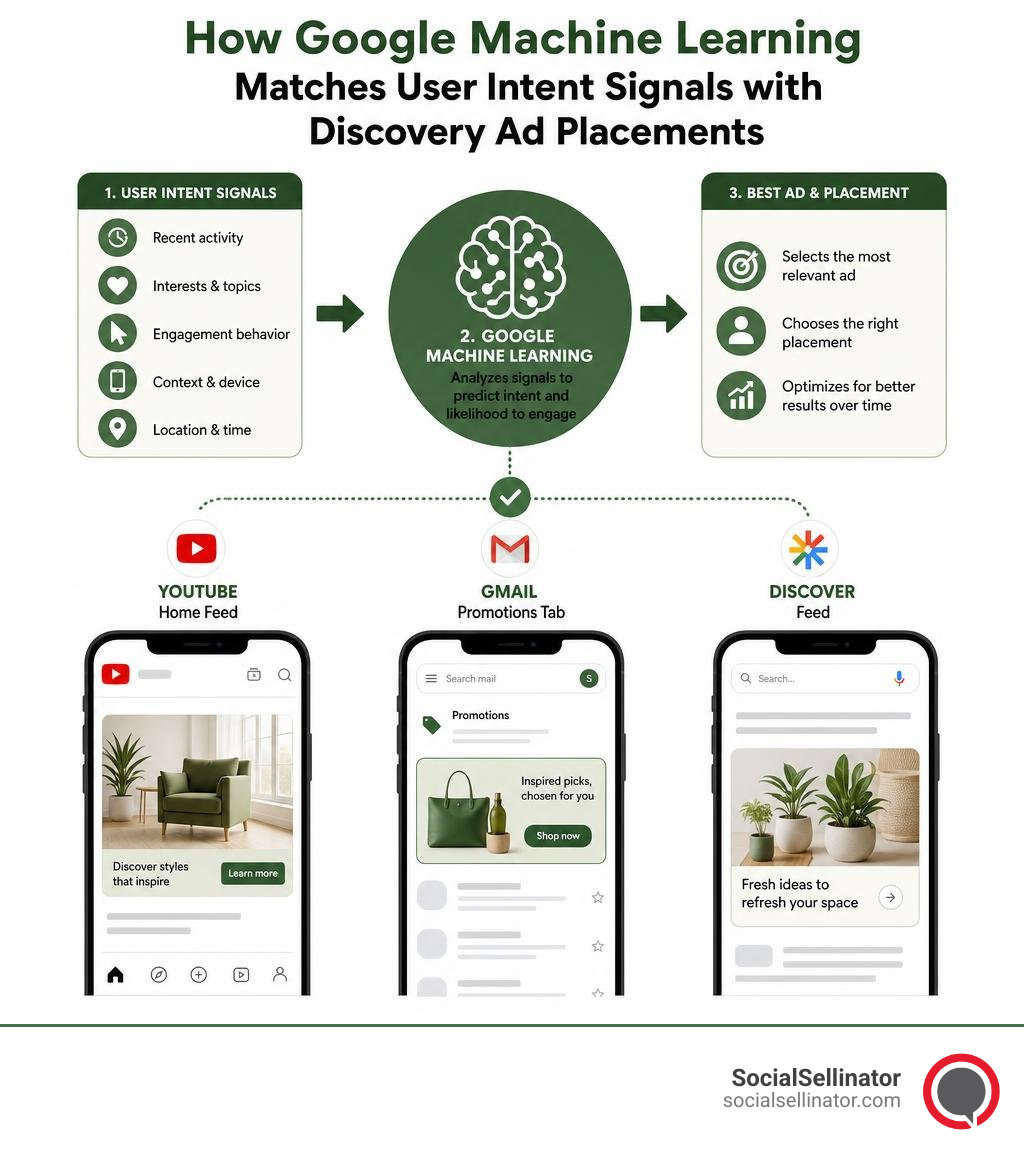
- How they work: Google’s machine learning reads user intent signals and serves your ads to people most likely to engage — before they even search
- Who they’re for: Brands wanting to reach new audiences at the top and middle of the funnel with visual creative
- Key benefit: One campaign reaches up to 3 billion users across three high-traffic Google surfaces
- What you need: Strong visuals, compelling copy, and a smart bidding strategy (Target CPA or Maximize Conversions)
Most paid ads wait for someone to search. Discovery ads are different.
They meet people in the moment — while they’re scrolling through their YouTube Home feed, checking Gmail, or browsing Google Discover. Google’s machine learning does the heavy lifting, matching your creative to users whose behavior signals they’re ready to engage.
This is what makes Discovery campaigns so valuable for marketing leaders who want qualified reach, not just impressions. Instead of chasing clicks, you’re showing up in the right feed, for the right person, at exactly the right time.
But getting results isn’t automatic. The secret is understanding how Google’s algorithm reads intent, how to build creative assets that stop the scroll, and how to set up your campaign so the machine learning has room to work.
That’s exactly what this guide covers.
Must-know discovery google ads campaigns terms:
What Are Discovery Google Ads Campaigns and How Do They Work?
To truly master discovery google ads campaigns, we must first understand the powerhouse engine running beneath the hood: Google’s advanced machine learning. Unlike traditional Search ads that rely entirely on a user typing a specific keyword into a search bar, Discovery campaigns look at the broader picture. They analyze deep intent signals gathered from across the entire Google ecosystem.
These intent signals are incredibly rich. They include a user’s past search queries, their map searches, their YouTube watch history, the apps they download, and even their content preferences. Google takes this massive, anonymized puzzle of user behavior and pieces together a highly accurate profile of what that user is interested in right now.
When a user opens their favorite Google feed, the system instantly evaluates these intent signals. If your campaign’s targeting and creative align with that user’s current interests, Google serves your ad seamlessly into their feed. It feels less like an intrusive interruption and more like a personalized content recommendation.
This sophisticated audience targeting allows us to move beyond simple demographics. With Discovery ads, we can target users based on:
- Custom Intent / Custom Audiences: Reaching people based on what they have recently searched for on Google.
- In-Market Segments: Connecting with users who are actively researching and planning to buy a product or service in your category.
- Life Events: Reaching people in the midst of major milestones, such as moving, starting a business, or getting married.
- Affinity Audiences: Targeting users based on their long-term passions, habits, and lifestyle choices.
- Remarketing and Customer Match: Re-engaging past website visitors or uploading your first-party customer lists to nurture existing leads.
By combining these advanced targeting options with striking visuals, you create a highly relevant experience for your prospective customers. For a deeper dive into managing these complex targeting systems, check out our Google Ads management complete guide.
The Core Differences: Discovery vs. Traditional Display Ads
It is easy to confuse Discovery campaigns with traditional Display campaigns, as both rely heavily on visual image assets. However, they serve completely different purposes in your marketing mix and yield vastly different engagement levels.
Traditional Display ads run across the Google Display Network, which consists of millions of third-party websites, mobile apps, and niche blogs. While the reach is massive, these placements are often plagued by “banner blindness” and lower user intent. People browsing a random recipe blog or playing a mobile game are rarely in a mindset to discover new brands or make a purchase. They are focused on the content they came for, making Display ads feel passive and sometimes even annoying.
In contrast, discovery google ads campaigns are served exclusively on Google’s premier, owned-and-operated properties. These feeds are native environments where users actively go to find inspiration, catch up on news, or watch engaging videos. Because the user is already in an active browsing and learning mindset, they are far more receptive to native, high-quality visual ads.
To make the distinction clear, let us compare the two side-by-side:
| Feature | Google Discovery Ads | Traditional Display Ads |
|---|---|---|
| Primary Placements | YouTube Home & Watch Next, Gmail (Promotions/Social), Google Discover | Millions of partner websites, mobile apps, and blogs across the web |
| User Intent Level | High (Users are actively looking for fresh content, ideas, and inspiration) | Low to Passive (Users are consuming unrelated content and often ignore banners) |
| Ad Formats | Highly structured, native single-image and multi-card carousel ads | Standard banners, responsive display ads, text links, and rich media |
| Targeting Basis | Deep intent signals, search history, app usage, and robust audience segments | Keywords, topics, placements, and basic demographics |
| Bidding Options | Exclusively Smart Bidding (Target CPA, Maximize Conversions) | Manual bidding, Enhanced CPC, Viewable CPM, and Smart Bidding |
Where Do Discovery Google Ads Campaigns Appear?
One of the greatest strengths of Discovery campaigns is their exclusive, premium real estate. Your creative assets are delivered across three massive Google surfaces that collectively reach over 3 billion active monthly users:
- The YouTube Home and Watch Next Feeds: YouTube is the world’s second-largest search engine. When users open the YouTube app on their mobile devices or browse the desktop homepage, they are looking for something interesting to watch. Your Discovery ad appears right in this prime stream, looking like a native video suggestion but leading directly to your website.
- The Gmail Promotions and Social Tabs: Millions of people check their Gmail accounts multiple times a day. Discovery ads appear at the very top of the Promotions and Social tabs, styled as elegant, expandable teasers. When clicked, they open up to display a rich, interactive ad that behaves like a mini-landing page.
- The Google Discover Feed: This is Google’s highly personalized mobile feed, accessible via the Google app or on the home screen of many Android devices. It curates articles, videos, and news tailored specifically to a user’s unique interests. Placing your ad here puts your brand alongside the content they already love and trust.
Whether your target audience is located in San Jose, Austin, Denver, or Boston, they are using these three platforms daily. This makes Discovery campaigns an incredibly reliable way to maintain local and national visibility. To ensure your campaigns are fully optimized, we make sure to avoid referencing external competitor tools like Semrush, Ahrefs, or Moz, focusing instead on native Google insights and first-party data.
Ad Formats and Technical Specifications for Discovery Ads
To win with discovery google ads campaigns, your creative assets must be top-tier. Because these ads blend natively into personalized feeds, they must look like organic content rather than loud, flashy promotions.
To achieve this, Google requires a clean set of high-resolution images, logos, headlines, and descriptions. The system then automatically mixes and matches these assets to generate the best-performing combination for each individual user.
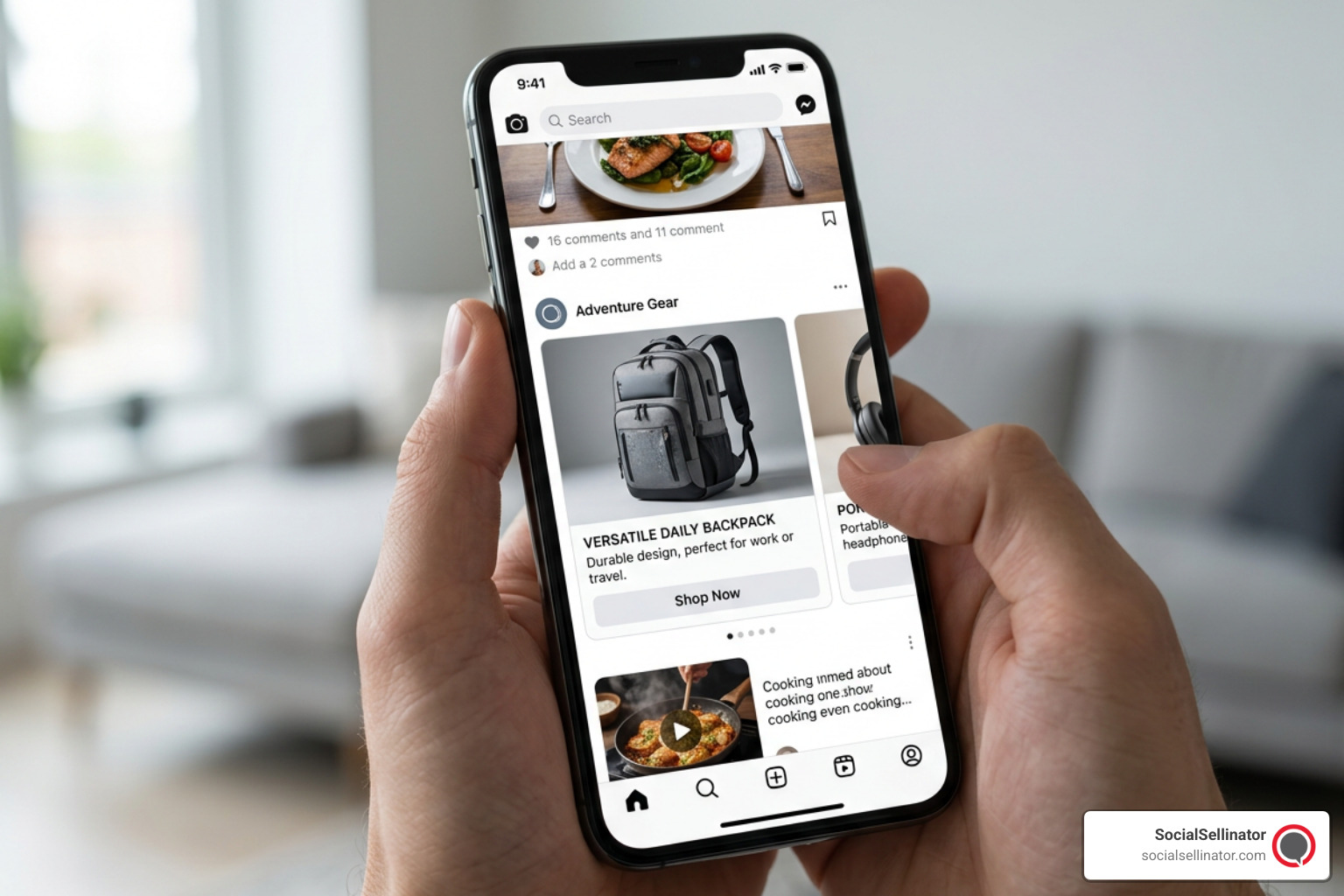
Image Metadata: Format: JPG, Resolution: 800×600, Category: Ad Creative, Alt text: Google Discovery carousel ad format mockup on mobile showing high-quality product cards.
Single-Image vs. Multi-Card Carousel Formats
When setting up your Discovery ads, you have two primary format options: Single-Image Ads and Multi-Card Carousel Ads. Both are highly effective, but they serve different storytelling goals.
Single-Image Ads
This format is clean, direct, and excellent for driving focus to a single hero product, a compelling lead magnet, or a clear service offering. To give Google’s machine learning engine enough variety to optimize your placements, you should upload several image variations. The supported aspect ratios are:
- Landscape (1.91:1): Minimum size of 600 x 314 pixels (1200 x 628 recommended). This is the classic wide format that looks great on YouTube and Discover.
- Square (1:1): Minimum size of 300 x 300 pixels (1200 x 1200 recommended). Essential for mobile feed layouts and Gmail.
- Portrait (4:5): Minimum size of 480 x 600 pixels (960 x 1200 recommended). Highly engaging on mobile screens as it takes up more vertical space.
Multi-Card Carousel Ads
If you want to showcase a product collection, highlight a step-by-step process, or tell a sequential brand story, the multi-card carousel format is your best friend.
- You can add between 2 and 10 cards per ad.
- Each card contains an image (either 1.91:1 landscape or 1:1 square, but they must all use the same aspect ratio within a single carousel), a short headline, and a destination URL.
- Users can swipe through the cards horizontally, making this format highly interactive and engaging.
Asset Specifications and Copywriting Best Practices
Your visual assets are only half the battle. Your copy must work in perfect harmony with your images to drive action. Because you do not control exactly which headline pairs with which image, your text must be versatile, punchy, and clear.
Here are the strict technical limits you must follow:
- Headlines: Up to 5 headlines, with a maximum of 30 characters each. Keep them benefit-driven and exciting.
- Descriptions: Up to 5 descriptions, with a maximum of 90 characters each. Use this space to add detail, build trust, and provide a strong call to action.
- Business Name: Up to 25 characters. Ensure this is your recognizable, clean brand name.
- Call-to-Action (CTA) Text: You can let Google automate this, or choose from a set of pre-configured CTAs like “Shop Now,” “Sign Up,” or “Get Quote.”
To write copy that actually converts within these tight constraints, we recommend reviewing our expert Google Ads copywriting tips.
When crafting your copy and selecting your images, keep these vital rules in mind:
- Avoid Overlaid Text: Google will often reject images that have heavy text overlays, fake buttons, or promotional badges. Let your image speak for itself, and let your headlines do the talking.
- Use Real, High-Quality Photography: Stock photos that look overly staged or clinical tend to perform poorly. Opt for authentic lifestyle photography showing your product or service in action.
- Focus on the Angle of Curiosity: Because these are discovery-oriented feeds, curiosity-driven headlines (e.g., “The easiest way to scale your PPC”) outperform aggressive sales pitches (e.g., “Buy our PPC services now!”).
Step-by-Step Guide to Launching Your First Campaign
Ready to launch your first campaign? Let us walk through the process step-by-step to ensure your tracking, bidding, and audience structures are configured for absolute success.
Setting Up Your Discovery Google Ads Campaigns
- Create a New Campaign: Log into your Google Ads dashboard, click the blue “+” icon, and select “New Campaign.”
- Choose Your Objective: Select Sales, Leads, or Website Traffic. If you prefer, you can also select “Create a campaign without a goal’s guidance,” but selecting a concrete conversion-oriented goal helps Google’s machine learning optimize your delivery much faster.
- Select the Campaign Type: Choose Discovery (or Demand Gen, depending on your specific account interface updates).
- Set Your Geographic and Language Targeting: Be highly intentional here. If you are a business operating in specific hubs, target those exact areas (such as San Jose, Charlotte, Chicago, or Los Angeles) rather than targeting the entire country blindly.
- Establish Your Bidding Strategy: Discovery campaigns rely entirely on Smart Bidding. You must select either Maximize Conversions (great for getting the highest volume of conversions within your budget) or Target CPA (ideal if you have a strict cost-per-acquisition goal). To understand which strategy fits your business model best, read our comprehensive guide on Google Ads bid strategies.
- Define Your Budget: Set a daily budget that is at least 10 times your target CPA. If your target CPA is $50, your daily budget should be at least $500. This gives the algorithm enough daily conversion data to learn and optimize effectively.
- Build Your Audience Segments: Add your custom intent segments, remarketing lists, and in-market audiences to guide Google’s initial targeting.
Navigating the Two-Week Learning Period
Once you hit “Publish,” the most difficult part of the campaign begins: doing absolutely nothing.
Because discovery google ads campaigns rely so heavily on machine learning, they require a mandatory stabilization phase. This is often referred to as the “learning period,” and it typically lasts about two weeks.
During this time, Google’s algorithm is actively testing different creative asset combinations, analyzing user interaction rates, and finding the pockets of users most likely to convert. You might see wild fluctuations in your cost-per-click (CPC) and daily spend during the first few days. This is completely normal.
If you make major changes to your bidding, budget, or creative assets during these initial two weeks, you will reset the learning clock. Be patient, let the algorithm gather the necessary data, and resist the urge to tweak your settings until you have reached at least 40 to 50 conversions.
Advanced Optimization Strategies and Best Practices
Once your campaign has stabilized and has been running smoothly for a few weeks, it is time to transition from passive observation to active optimization.
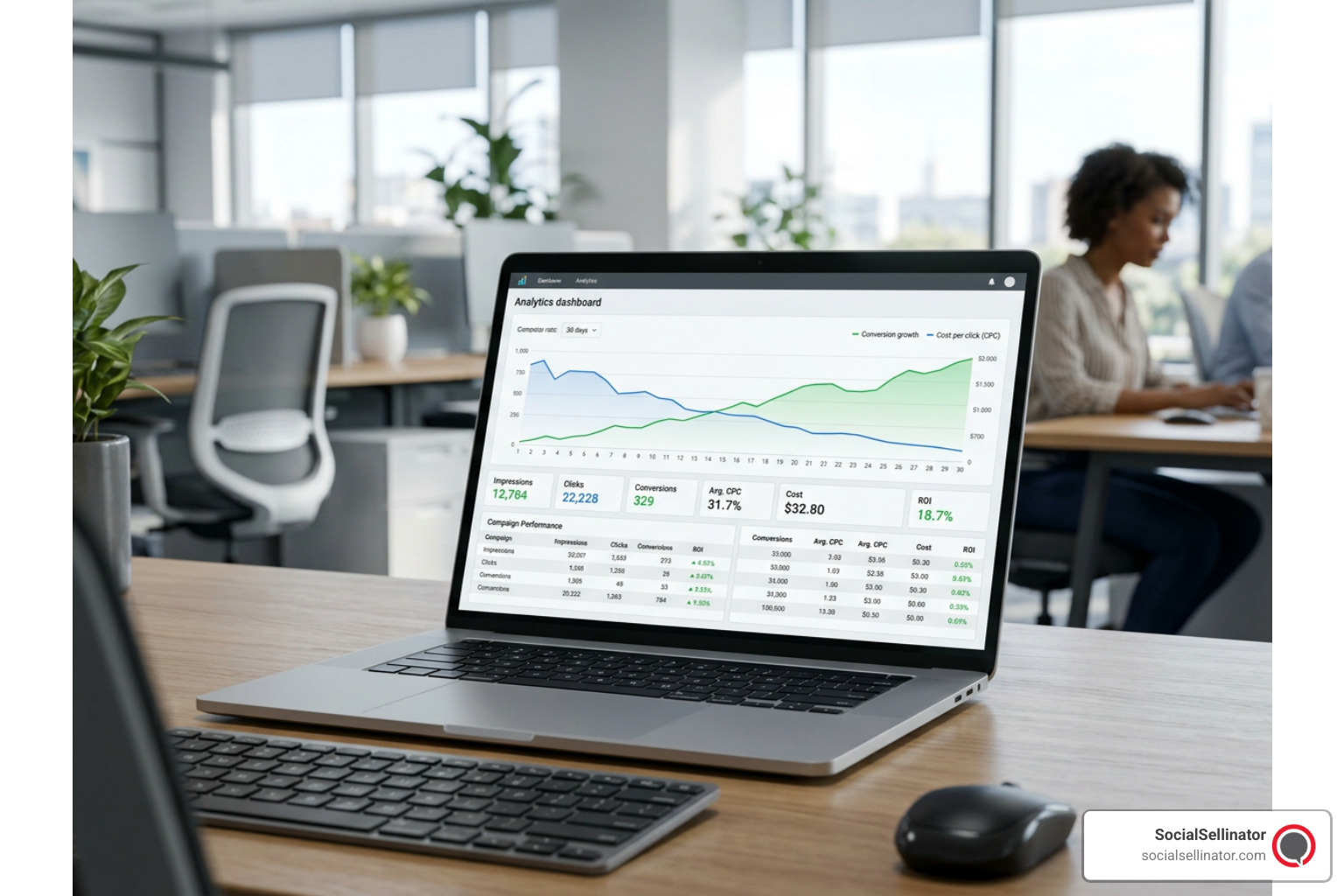
Image Metadata: Format: PNG, Resolution: 800×500, Category: Data Analytics, Alt text: Google Ads analytics dashboard showing conversion growth and CPC reduction over time.
Leveraging Machine Learning and Creative Testing
To get the absolute best return on your ad spend, you must treat your creative assets as a continuous science experiment. Google uses advanced tools like the Google Cloud Vision API and Natural Language Processing (NLP) to analyze your images and copy before they even serve them to users. The system categorizes your assets based on their visual content, color schemes, and textual themes to predict how well they will perform.
Once your ads are live, Google provides an Asset Performance Rating in your dashboard. Each asset will be labeled as “Low,” “Good,” or “Best.”
- Do not delete everything at once: If you see “Low” performing assets, replace them one or two at a time. This keeps your campaign stable while constantly upgrading your average creative quality.
- Test radically different concepts: Don’t just test minor variations of the same image. Test a lifestyle photo of a person using your product against a clean product-only shot. Test a curiosity-inducing headline against a direct offer.
- Watch your interaction rates: High interaction rates (clicks and swipes on carousels) indicate that your creative is successfully stopping the scroll. If your interaction rate is low, your images are likely too generic or look too much like traditional banner ads.
Budgeting and Bidding for Maximum ROI
Scaling a Discovery campaign requires a delicate touch. Because the algorithm relies on consistent patterns, sudden budget spikes or dramatic bid drops can throw the system back into a learning phase.
- Scale Budgets Gradually: If your campaign is performing exceptionally well and you want to increase your budget, do so in increments of 15% to 20% every few days. This allows the machine learning engine to scale up seamlessly without breaking its optimization patterns.
- Use the Daily Budget Multiplier: Always ensure your daily budget is large enough to support healthy conversion volume. If your budget is too restrictive, the machine learning algorithm will struggle to find conversions, and your delivery will slowly stall out.
- Adjust Target CPA Mindfully: If you need to lower your CPA, reduce your target CPA by no more than 10% at a time. Give the system a few days to adjust to the new constraint before making further reductions.
Frequently Asked Questions About Discovery Ads
What is the difference between Search ads and Discovery ads?
Search ads are reactive; they appear when a user actively types a specific query into Google, capturing high-intent users at the very bottom of the funnel. Discovery ads are proactive; they use rich visual formats to engage users based on their historical intent signals while they browse their favorite feeds, capturing users at the top and middle of the funnel.
How long should I wait before making changes to my Discovery campaign?
You should wait at least two weeks (or until your campaign has generated at least 40 to 50 conversions) before making any changes. This gives the machine learning algorithm ample time to complete its learning period and stabilize its bidding strategies.
Can I use manual bidding strategies with Discovery campaigns?
No. Discovery campaigns are designed to work exclusively with Google’s Smart Bidding strategies, such as Maximize Conversions and Target CPA. This ensures that the system can optimize your bids in real-time based on millions of user signals.
Conclusion
Mastering discovery google ads campaigns is all about striking the perfect balance between human creativity and machine intelligence. By feeding Google’s algorithm high-quality visual assets, writing highly compelling copy, and giving the smart bidding system the budget and time it needs to learn, you can unlock an incredibly scalable source of qualified leads and sales.
At SocialSellinator, we specialize in helping businesses navigate these complex, visual-first ad platforms. Our team of experienced digital marketing professionals handles everything from advanced PPC management and deep SEO strategies to stunning content creation and analytics. We take the guesswork out of your digital marketing, allowing you to focus on running your business while we drive measurable, cost-effective results.
If you are ready to take your digital marketing to the next level and dominate your market, partner with SocialSellinator for Google Advertising today.
Headquartered in San Jose, in the heart of Silicon Valley and the San Francisco Bay Area, SocialSellinator proudly provides top-tier digital marketing, SEO, PPC, social media management, and content creation services to B2B and B2C SMB companies. While serving businesses across the U.S., SocialSellinator specializes in supporting clients in key cities, including Austin, Boston, Charlotte, Chicago, Dallas, Denver, Kansas City, Los Angeles, New York, Portland, San Diego, San Francisco, and Washington, D.C.